
Back to Help Center
Stay Dashboard Guide
About the Stay Dashboard
About the Listing Page
About Edit Listing
About Analytics
About the Inbox & Notifications
About Stay Settings
About the Stay Dashboard
The Stay Dashboard is the area of the Host Portal where you manage one specific Stay. Open it by clicking a property on your Organization's Properties page.
The parts of a Stay Dashboard
Once a Stay is selected, the side menu shows two groups underneath your Organization items, with a Listing strength meter and a View Public Page button at the bottom:
- Stay
- Overview: the summary page. Application status, views and booking link clicks, interested travelers, marketing at a glance, the Strength Checklist, and your Host Premium status.
- Edit Listing: one page with four tabs, Location, Details, Media, and Links, that hold everything on your public Listing Page.
- Inbox: notifications and messages about this property only.
- Analytics: listing views, booking link clicks, social link clicks, leads, and (with Host Premium) link-level detail and search appearances.
- Stay Settings: publish or unpublish the listing, preview it, or delete it.
- Marketing
- Leads: travelers interested in this Stay and the private Invites you send them. Covered in the Leads & Invites Guide.
- Offers: deals displayed on your Listing Page and in traveler feeds. See the Offers Guide.
- Promotions and Giveaways: Instagram campaigns through our partnered outlets. See the Promotions Guide and Giveaways Guide.
- Creator Marketplace and Creator Inbox: partner with content creators. (coming soon)
View Public Page opens the Listing Page as travelers see it, in a new tab, even before it is published.
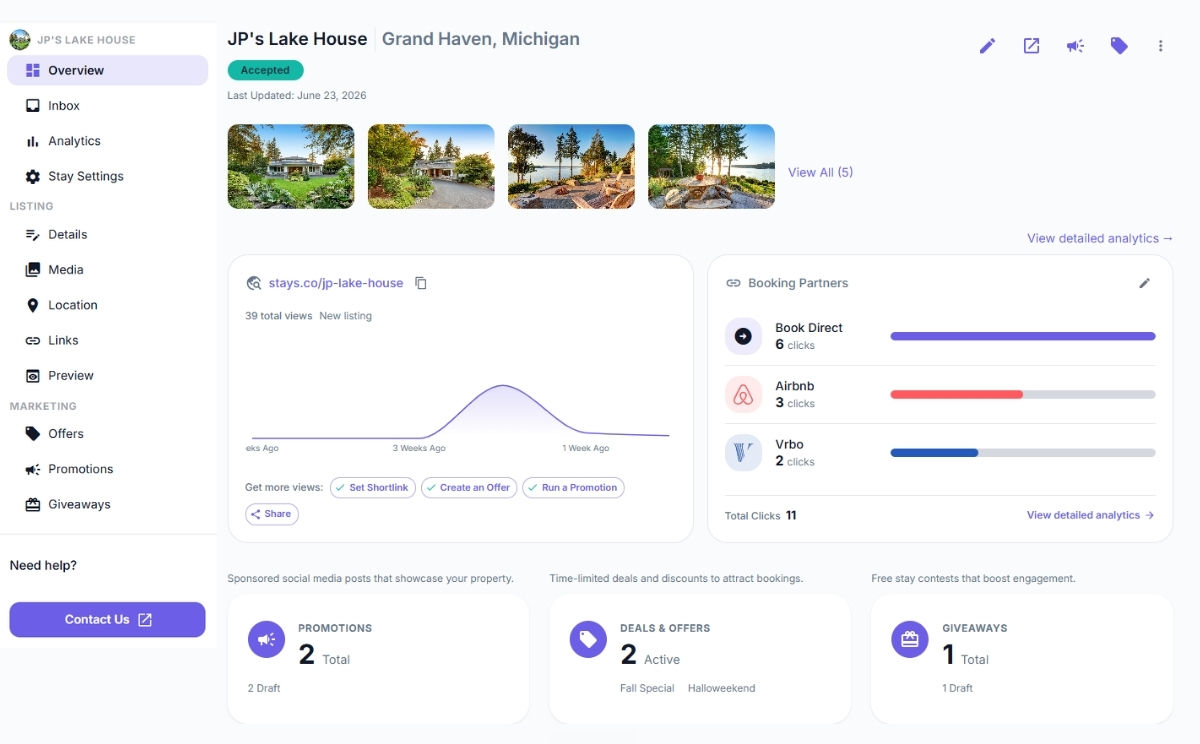
Snapshot of the Stay Dashboard
What is on the Overview
Header and status
The top of the page shows the Stay name and location, its application status (Submitted → In review → Decision), a Verified badge once our team has verified the listing, the last-updated date, and a strip of your photos. While an application is submitted (before review starts) you can still edit it from here. When feedback exists (Needs Revision or Limited) you will find View Feedback and Edit & Resubmit here.
Views, shortlink, and booking partners
A views chart for the last several weeks (with the change versus the previous 7 days), your stays.co shortlink, and a Get more views row with shortcuts to Create an Offer, Run a Promotion, Start a Giveaway, and Share. Below it, Booking Partners lists each booking link you added with its click count, plus a link into detailed Analytics.
Interested travelers
A card counts the travelers who viewed, favorited, or clicked through from this listing recently, with a View Leads link. On the free plan the count is visible while the individual leads are gated.
Marketing at a glance
Three cards summarize this Stay's Promotions (total, published, submitted, draft), Deals & Offers (active and inactive), and Giveaways (total, in queue, draft). Each opens the matching page.
Strength Checklist
Every property on Stays has a listing strength, a 0 to 100% measure of listing completeness and traveler value. Stronger listings rank higher in the directory, collections, and search, so the Overview shows exactly what goes into yours and lets you knock items out one by one:
- Complete your Org Page: add your intro, imagery, and contact info to your Organization's public page on stays.co (shown for multi-property Organizations).
- Add your booking links: link the platforms where travelers can book.
- Add a direct booking link: point travelers at your own booking site. It is the first thing many of them look for, and it earns the Direct booking badge on your directory card.
- Tag your special interests: pick at least three interests that fit your stay so it turns up when travelers browse for them.
- Set your shortlink: claim a short, memorable stays.co link.
- Create an offer: post a deal on your Listing Page.
- Create a promotion: set up your first social promotion.
- Share your stay page: send your listing link to your audience and past guests. This one you check off yourself (copying your shortlink on the Overview also completes it). An Explore the creator marketplace item appears when the marketplace launches.
Host Premium card
Free Organizations see a short pitch for Host Premium with an Explore Host Premium button. Premium Organizations see an Active card instead.