One property, one listing on Stays
If you run a handful of cabins on the same land, a cluster of cottages around a lake, or a small building with six similar apartments, you already know the listing problem. Airbnb makes you list every unit separately. So does Vrbo. You end up with four nearly identical listings, four sets of photos to keep current, and travelers who can't tell whether they're looking at four places or one.
Stays handles this differently. A property with several similar units gets one Listing Page. Travelers see the size as a range, a note on what varies, and a Choose your unit button that takes them to your site to pick the exact one. You maintain one listing instead of four, and that one listing is stronger than any of the four would have been on its own.
This article covers why we do it this way, when units should share a listing and when they shouldn't, what travelers actually see, and the handful of things that trip hosts up when they set it up.
Why we built it this way
Stays isn't a booking site. Nobody reserves a specific unit on a specific night here. Travelers discover your property, compare their booking options, and book on the channel you point them to. That changes what a listing is for.
On a booking platform, the listing has to be the exact thing being reserved, so one listing per unit makes sense. On a discovery platform, the listing's job is to get a traveler interested in your property and send them to you. For that job, "six cabins on 40 acres with a shared dock" is one story, not six. Splitting it into six listings makes each one thinner, dilutes your photos and reviews across copies, and clutters the Directory with near-duplicates that travelers skip past.
There's a ranking reason too. Placement on Stays leans heavily on listing strength, the Strength Checklist you see on your Overview. One complete listing with a direct booking link, host recommendations, a live Offer, and a claimed Custom URL will outrank four half-finished copies every time. Multi-unit lets you put all your effort into one.
When units should share a listing on Stays
The test is simple: would a traveler reasonably choose between these units on your website? If yes, they belong on one listing.
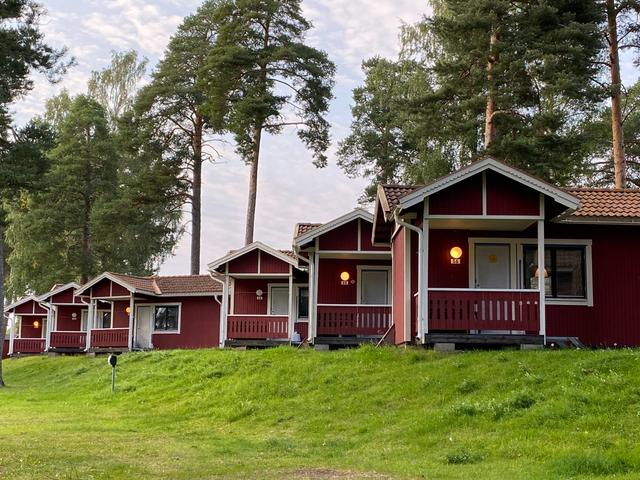
That usually means the units share a primary address, share a property type, and offer a broadly similar experience. Cabins on one piece of land. Micro-cottages at one RV resort. Apartments or condos in one building. Rooms at a small inn or lodge. Glamping tents or yurts on one site.
Differences in size are fine. We allow multi-unit listings to provide a 'range' of not only the number of guests that can be accommodated, but the number of bedrooms and bathrooms as well.
Differences in small details, a few amenities, or logistic consideration are fine too. There's a "What varies by unit" note that is displayed on multi-unit listings that account for this. "Cabins 3 and 4 allow pets," "Studios have kitchenettes, not full kitchens," "Units on the top floor have lake views."
When units shouldn't share a listing on Stays
Keep separate listings when the units are different experiences, even if they're at the same address. A lakefront main house and a rustic bunkhouse behind it. A luxury villa and the caretaker's cottage you also rent. A treehouse and a traditional cabin on the same land. Travelers looking for one of those aren't shopping for the other, and a combined listing would sell both short.
Also keep separate listings for properties at different addresses, even when they're similar. Three identical cottages in three different towns are three listings. Your Organization groups them, and once two or more are live you get an Org Page that shows your whole portfolio in one place.
If you're on the fence, ask whether you'd put the units on one page of your own website or on separate pages. Do the same on Stays.
What travelers see
A multi-unit listing looks basically like any other Listing Page with a few additions.
In the Directory, your card carries a Multi-unit property badge so travelers know up front they're looking at a property with options. On the Listing Page, a pill over the hero photo reads "Multi-unit property · 6 units," and the main button says Choose your unit instead of See booking options.
Capacity, bedrooms, and bathrooms show as ranges from your smallest unit to your largest, with a short caption explaining that. If every unit is the same size, travelers see one number. Bed types are hidden, since units rarely share one bed layout.
Below the basics, a What varies by unit panel shows the note you wrote. The booking section adds one line, "6 units at this property. Pick the exact unit when you book," and your links take travelers to the page where they choose.
Everything else works the same. Favorites, Offers, Leads, Invites, Promotions, Giveaways, and your Strength Checklist all apply to the listing as a whole.
Setting up multi-unit listings on Stays
Multi-unit is a switch on the Details step of your Stay Application, or in the 'Edit Listing --> Details' area within a Stay Dashboard for an existing listing.
Host will see a toggle to control this: "Multiple units at this property?". Simply turn it on and set the unit count, from 2 to 200. The size fields split into largest unit and smallest unit. Then write the what-varies note.
The switch is the easy part. Here's what to get right around it, roughly in order of how often hosts miss it.
1. Booking links go to a 'choose-your-unit' page or a centralized host page, not one unit's listing. This is the big one. If your direct link lands on Cabin 2's booking page, travelers who wanted Cabin 5 bounce. Point every booking link, direct or OTA, at the page where guests pick a unit: your accommodations page, your booking engine's property page, or your Airbnb or Vrbo host profile.
2. Photos represent the property, not one unit. Lead with the shot that says "this is the whole place": the row of cabins, the building, the shared dock. Then interiors from more than one unit, labeled in the caption if they differ. A cover photo of a single cabin interior undersells a six-cabin property.\
3. Name it for the property. "Pine Ridge Cabins," not "Pine Ridge Cabin 2." The description should say how many units there are, what they share, and how guests choose.
4. Write the what-varies note. It's optional, but a listing without one leaves travelers guessing. Two or three specifics beat a paragraph: "Studios have kitchenettes. Cabins 3 and 4 are pet friendly. Upper units have lake views."
5. Answer the shared questions for the property as a whole. Property type is the category most of your units fall under. Nightly rate is the range across units, or the rate for the unit you plan to feature. Amenities are what most units have, with exceptions in the note. Special Interests and nearby attractions are about the location, which every unit shares.
6. Keep the count honest. Set it to the number of units a traveler can actually choose from. If you add or retire a unit, update it. The count shows on the badge, so a wrong number is a visible wrong number.
One more on the application process: if you use Stays AI to draft your application from a booking link, it fills in the facts but leaves the multi-unit switch to you. Check Details before you submit.
Already submitted separate applications?
Plenty of hosts apply once per unit because that's what every other platform trained them to do. If our team sees several applications that are clearly units at one property, we'll combine them into one multi-unit listing during review and send you a revision request explaining what we did and what to check before you resubmit. The checks are the six items above, with booking links and photos at the top of the list, because the combined listing keeps one application's content and your links and photos may have been written for a single unit.
You can save that round trip by applying once with the multi-unit switch on. And if your units really are different experiences and shouldn't be combined, reply to the revision request and tell us why. We'll take a look.
The short version
One address + similar units = one listing on Stays.
Turn on multi-unit in the 'Details' section of your Stay Application, set the unit count and the smallest and largest sizes, write a short what-varies note, and make sure every booking link lands on a page where guests choose their unit. Then put the effort you would have spread across four listings into making this one strong.
The field-by-field walkthrough, including how the Details tab and Listing Page look once multi-unit is on, is in the Stay Dashboard Guide. How applications work in general is in the Hosting Guide.